
For a job application, I was asked to put together a project plan for a Healthcare referral company looking to use technology to revamp one or more business processes. I’ll attach the request document here, and then include my response. The request includes a number of architectural changes within Salesforce as well as recommendations for version control and maintaining the platform going forward.
Customer Data Model
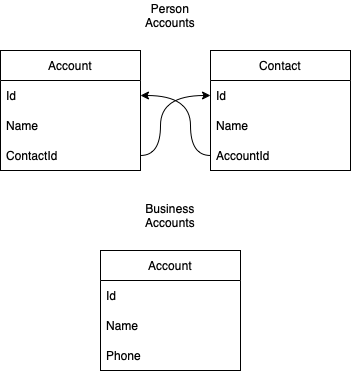
Customer Data and Related Contacts
- Enabling Person Accounts should allow for a cleaner data model for customers by opening up some additional functionality within the system. It also opens up cleanly using business accounts for tracking partner clinics and tracking the services they provide
- Account Contacts can be used for tracking family members in the system, and allowing customers to easily transition into managing their own care in our system once they turn 18.
- If leveraging opportunities, Opportunity Contacts can also be leveraged for tracking recipient of care
Transition Plan/Considerations
- Transition to Person Accounts requires assistance from Salesforce.
- The change shouldn’t create outages for end-users as we’re essentially creating accounts for existing contacts in the system and then pairing them
- Reports using Accounts MAY need to be updated to filter out the new Person Accounts
Product Data Model
Tracking Multiple Products and Care Recipients
- Utilize Opportunity for tracking customer sign-up for therapy through path
- Utilize Opportunity Products (or custom object) for tracking multiple appointments against a single Opp or customer
- Note this can also be done via custom object. Using Opportunity products also requires use of Pricebooks and Pricebook line items, but pre-configures price tracking if the business wants to go there in the future.
- A Custom Object simplifies the data model but duplicates some functionality and requires a migration if cost tracking is required in the future
- With the use of Opportunities, depending on business convention, an Opportunity can be created on a per-therapeutic-relationship basis, or per-customer-outreach basis
- For the Latter, Opportunity Line Items should be updated to include a relationship to contact to directly identify the recipient of care.
Transition Plan/Considerations
- Existing Data Model will need significant updates.
- Recommend updating data model, automating updates, and then doing a one-time data load to re-sync to new model.
- This can be hidden from users via workflows, and the automation approach reduces down-time to just updating agent UI and reporting/dashboards
- Updates to integrations will need to be evaluated and updated to support these changes

- Multiple Opportunity Contacts can be linked to single Opportunity to describe multiple recipients of care for a single care referral (eg. couple’s counseling)
- Multiple Opportunity Products can be linked to a single Opportunity to describe one or more care recipients looking for referrals to multiple types of counseling.
User Administration
Profile/Permission Changes
- Work with business to determine desired access model
- Ex. All users can edit all/most fields, Restrict edits to fields by job function, Restrict objects by job function, etc.
- Interview users to understand which objects and fields they use and for what component of their job function
- Profiles should contain basic access and determine App/UI Access
- Permission Set Groups should cover Job Functions within the business
- Permission Sets should cover individual access objects and feature based on individual responsibilities
Role Hierarchy Changes
- Evaluate Regional Restrictions
- Start with Business Reporting Structure
- Make adjustments to Business reporting structure based on job function to simplify hierarchy
- Implement sharing rules for special cases
- Update Role Hierarchy after hours as it isn’t as instant of a change as updating permission sets.
- Leverage Account Teams when viable to simplify sharing rules
Change Management
Change Requests
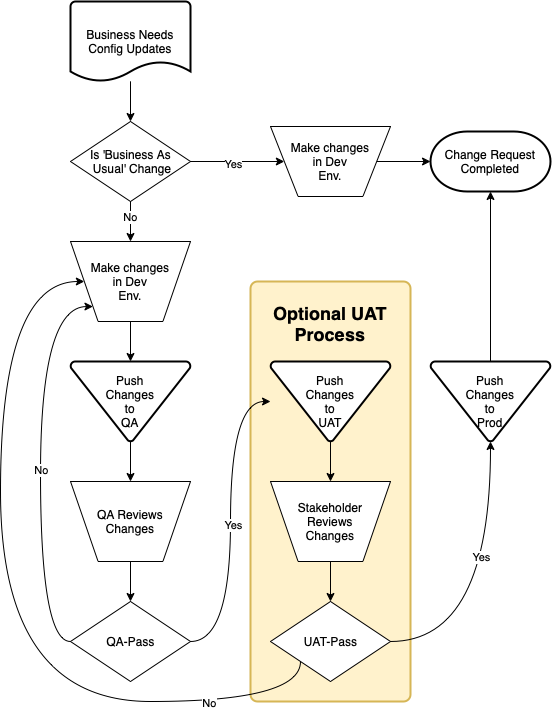
- Evaluate which changes should come with a ticket
- Do ‘Business as Usual’ changes completed by employees require a ticket?
- Do we have a ticketing system? If so, evaluate a solution.
- Tickets require a point of contact for the change and a business-case for why the change is needed
Employees Making “Business as Usual” Changes
- Evaluate which changes are safe to allow non-technical users to make in Production (eg. Picklists)
- Leverage Delegated Administration to allow users to make changes to part of the configuration, without exposing the entire configuration
Development Pipeline and Update Management
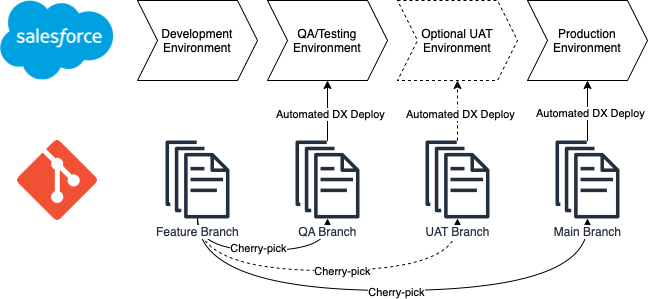
- For a couple of Admins/Developers, deployments using Change Sets is manageable. For more, we should evaluate the use of SFDX and Git for version control within the org.
- Dev and QA environment for testing changes prior to deploying to production. UAT environment which is refreshed from production frequently can also be leveraged according to need and number of changes flowing through the deployment pipeline.
- All changes should go from Dev -> QA -> UAT (If used) -> Prod
- ‘Business as Usual’ changes can be pulled in during the refresh cycle or manually when part of a new feature
Change Testing
- Ideally, QA is performed by another user than the author when possible. Exceptions for critical break-fixes.
- Code Reviews for automation changes like Flows and Apex
- Major Feature Updates should include user testing
- Apex Test classes should be written and updated for any code changes (this can also include flows and process builders)
Down-time and Communication
- Emails should be sent to impacted business users for planned and unplanned downtime
- Screen flows can be leveraged with Login flows to notify users of upcoming downtime or data model changes which may impact system useability, in addition to email announcements.
- Planned down-time should be communicated in advance
- Minor Feature Updates should include a notice to stakeholders on release
- Major Feature Updates should include user training/training materials
Down-time Alerting
- Salesforce automatically emails when system errors occur in Flows or Apex. This can be leveraged with a ticketing system or a log management tool for down-time alerting, or emails evaluated on their own
- Impacted users should be notified of unexpected outages once known, with follow-up when a fix is found, and once the issue is resolved.