Introducing CairnCI: A Modern, Open-Source Salesforce Deployment Pipeline

CairnCI is an open-source CI/CD pipeline for Salesforce DX, designed to automate the validation and deployment of changes. Built on GitHub Actions, it bridges the gap between Salesforce’s native tooling and code-first workflows, providing a community-maintained reference implementation that simplifies CI/CD for teams.

So. Change sets. We need to talk about change sets.

We’ve all been there. You’ve got a sandbox full of beautiful, carefully crafted metadata, a team that’s ready to ship, and then… you’re staring at the Change Set screen clicking individual components like you’re defusing a bomb. Except the bomb isn’t optional, and it definitely doesn’t care about your timeline.

If you’ve spent any time in the Salesforce ecosystem, you know the pain. Salesforce DevOps Center was a real step forward — and I’ve written about it before — but it’s still a Salesforce-native tool with Salesforce-native constraints. For teams that have grown into a more code-first, source-driven workflow, or who have specific governance requirements their org doesn’t bend to meet, there’s a real gap in the tooling available. Especially when it comes to CI/CD.

That gap is what CairnCI is trying to fill.


What is CairnCI?

CairnCI is an open-source CI/CD pipeline for Salesforce DX, built on GitHub Actions. It’s designed to be plugged into a Salesforce DX repository and handle two core things automatically:

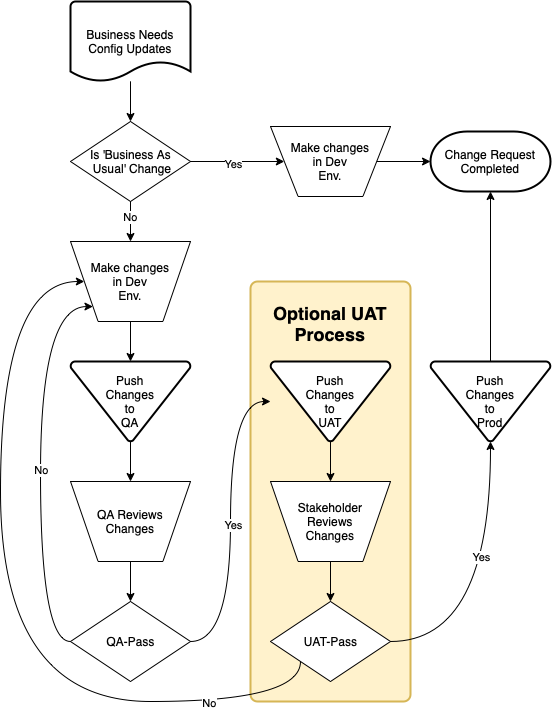
  • Validate on every pull request — runs a delta-only, check-only deployment against your org using RunLocalTests, so your team knows before anything merges whether the changes will actually deploy.
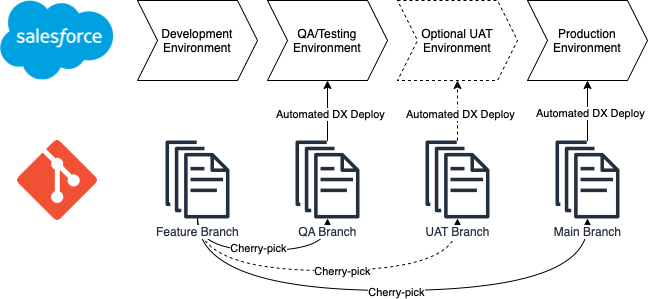
  • Deploy on merge — maps branches to environments, reuses the validation job-id from the PR for a quick deploy (because running all your tests again immediately after you just ran them is a special kind of tedious), with an automatic fallback to a full deploy if the validation has expired or isn’t available.

The name comes from the idea of a cairn — those stacked stone trail markers that hikers build to mark the way forward in terrain where the path isn’t obvious. That felt right. Salesforce DevOps can be a lot of terrain.


Why build this?

Honestly? Because I’ve set up enough Salesforce CI/CD pipelines from scratch to know that everyone is solving the same problems in slightly different ways, and most of the solutions are locked inside someone’s private company repo.

The Salesforce ecosystem has a lot of great individual tools — the sf CLI, sfdx-git-delta, GitHub Actions — but there isn’t really a good, community-maintained reference implementation that ties them together in a way that’s ready to adopt. So I built one, and I’m putting it out in the open so other teams can use it, adapt it, and (hopefully!) contribute back to it.

The goal isn’t to be a black box. CairnCI is designed to be extensible and transparent — you can see exactly what it’s doing, pin it to a specific version, and override its behavior through inputs or a committed config file.


Who is it for?

If you’re running a Salesforce DX project with your metadata in source format and you’re using GitHub, CairnCI is probably useful to you. In particular:

Developers and admins who are tired of manual deployments. If you’re still clicking through Change Sets or running sf project deploy by hand every time someone wants to push code, CairnCI automates that entire loop from PR to production.

Teams that want to adopt modern DevOps practices without building everything themselves. You don’t need to write and maintain your own GitHub Actions workflow from scratch. CairnCI gives you a starting point that already handles the tricky bits.

Organizations with compliance or security requirements. There’s a “vendor” adoption path specifically for air-gapped or strict-security environments where every line of executed CI code needs to live in your own repository, reviewed and pinned — no external action references at runtime. This one comes up a lot in government and regulated industries.


The two ways to adopt it

CairnCI supports two adoption paths, and the choice really comes down to how much control you want over the pipeline code:

Path A (Recommended for most teams): Reference a pinned version. Your repo adds a few small caller workflows, and the heavy lifting stays in CairnCI. When CairnCI releases an update, you bump a version tag. Your .cairnci/config.json file controls which features run and how. This is the “lean” option — minimal code to maintain, easy updates.

Path B: Vendor a pinned version into your repo. You copy the pipeline code directly into your own repository. From that point on, CairnCI isn’t an external dependency — everything runs locally from your repo. This is the right choice if your organization’s policy requires that every line of executed CI code is reviewed and committed in-repo. Re-running an update means copying a new tagged version and reviewing the diff in a PR.

Both paths support the same feature set.


The field governance gate (my personal favorite)

One of the things I’m most proud of in CairnCI is the optional field permission-set governance gate. This one takes a little explaining, but stay with me.

When you add a new field to a Salesforce object, it doesn’t automatically become accessible to anyone. Someone has to wire up permission set access, or the field just… sits there, invisible to your users. And in a team environment, it’s surprisingly easy for that to slip through code review. You’re looking at the field definition, you’re checking the Apex tests, and nobody notices that there’s no permission set entry for it.

The field governance gate catches that at the pipeline level. Before a PR can merge, it checks that any new fields in the changeset have the appropriate permission set access configured — and optionally, that they include required governance metadata. If they don’t, the gate blocks the deploy and tells you exactly what’s missing.

It’s the kind of thing that saves a lot of “wait, why can’t users see the new field?” tickets.


What it’s built on

CairnCI is built on tools that are well-maintained and widely used in the Salesforce developer community:

  • The modern sf CLI (not the legacy sfdx) for all Salesforce operations
  • sfdx-git-delta for generating delta packages — only deploying what actually changed, not your entire source directory every time
  • GitHub Actions for the automation layer
  • GitHub Environments for secure org credential management and deployment protection rules

All of the toolchain versions (Node, the SF CLI, sfdx-git-delta) are pinnable, so you’re not at the mercy of whatever latest decides to be on the day your pipeline runs.


Rollback support

One thing that trips teams up: a validation can pass, a merge can happen, and then the real deploy to production can still fail — timeouts, org-state drift, row locking, you name it. Salesforce will automatically roll back the org when a deploy fails, but your git branch still contains the merged change that never actually landed.

CairnCI has optional rollback support to handle this. You can configure it to automatically open a PR that reverts the merged change, or to push the revert directly (if your branch allows it). The deploy job still reports failure so the problem stays visible — no silent pretending everything is fine.


Getting started

The repo is at github.com/Fossiltalk/CairnCI and the docs/consumer-setup.md file walks you through the whole setup. The short version for Path A:

  1. Get an SFDX auth URL for each of your orgs
  2. Store it as a secret in a GitHub Environment
  3. Copy the example caller workflows into your .github/workflows/ directory
  4. (Optional) Add a .cairnci/config.json to control behavior in-repo

A minimal validate workflow is literally six lines. That’s it.


This is version 1 — contributions welcome

CairnCI is community-maintained and open to contributions. There’s a lot of room to grow — more governance gates, expanded rollback options, additional runner support, whatever the community finds most useful. If you run into a bug, have a feature idea, or want to contribute, the repo is open and I’m paying attention to it.

The goal is for this to be the kind of tool that teams actually want to use — not a pipeline they cobble together under deadline pressure and then never touch again because nobody understands how it works. Something maintainable. Something that a human has to deal with.

Because at the end of the day, there’s always a human who has to maintain it. 👀


CairnCI is not affiliated with or endorsed by Salesforce, Inc. “Salesforce,” “Salesforce DX,” and “SFDX” are trademarks of Salesforce, Inc.
Help Me! I’m at a Startup and I’m Overwhelmed!

Questions popup all the time about what to do when you’re overwhelmed at a startup. There’s no project management, everything is an emergency, there’s no detail on any requests, and there’s no time to ask questions. It’s awful to be a part of, and it feels like things are out of control. Often times though, things are out of control, but they don’t have to be. I’ve had a few adventures with startups, and it turns out that most of the time things are out of control because people don’t understand how to push back and how to take command. This article describes my process, and was a response to another Salesforce Admin who felt overwhelmed and posted about it online. I hope it helps you if you’re in the same place as he.

1. Find a Friend

Find someone you can talk to, who understands you, even if they don’t understand the problem. This person is your opportunity to not only get your frustrations off your chest, but also to practice communicating issues effectively and in a way that lay persons can understand.

Focus on 3 points:

  1. Without placing blame, what is the problem?
  2. What is the impact on the business? Think dollars, risk, and scalability.
  3. How do we fix it, and what is the cost to do so?

You can do this.

2. Document Requests

Start using a project management tool. Jira and Asana are free for up to 10/15 users on a team, I believe. Creating tickets for every request sucks, but what’s worse is doing 50 hours of work and only being able to account for 30 hours of it. Asana is easy so I’d probably start there. It also integrates with Slack so you can convert a message directly to a ticket and notifies them automatically when the ticket is completed.

You can do this.

3. Don’t Determine Priority by Yourself

Startups are rife with manufactured urgency. I was once told by a C-level that I would be replaced by someone from Fivver if I didn’t produce a chatbot within 3 business days. It took 8 months and half-a-million dollars for the contractors to build the bot, which I later built for a hack-a-thon in 12 hours. I outlasted her.

Learn how to tell people “no”. When most people tell you the deadline is tonight or tomorrow, what they really mean is that they have other priorities which would prevent them from looking at it until then. That doesn’t mean it actually has to be completed at that point.

If for some strange reason it does need to be, then you should ask them to tell you what of your active projects should now be deprioritized to make room for it.

If they have no active projects to deprioritize, point them toward the owner of your current working projects and ask them to negotiate between themselves. If they won’t do that, then it’s clearly not a priority.

In my experience, 95% of these scenarios take care of themselves by this point. Remember, you’re not the one responsible for assessing priorities between requests from other teams.

You can do this.

4. Plan With Stakeholders Around Weekly Capacity

By this point you should be well-versed on your own capacity. If not, it’ll come to you quickly as you take on projects which are more or less involved than you thought. Now you start hosting stand-ups with your primary request-givers. Once per week for 15-30 minutes is a good place to start. Go through the backlog of tickets you haven’t completed, then ask about any new requests for the week, and ask them to prioritize them with you live. Once you hit 80% of your capacity for the week, stop. You need the extra 20% for ticket writing, breakfixes, misjudged capacity, and mental health.

Congratulations on your first capacity planning meeting.

You can do this.

5. Periodically Review Old, Open Requests

At 3 months, host a slightly longer session where you go through the backlog and review requests which are at least 2 months old and determine whether these project should be kept in the backlog or canceled.

Make sure to include a note on why canceled items were canceled. A number of them will be due to changes in business priorities. Those weren’t a high priority and now the business doesn’t care about them. Aren’t you glad you didn’t work through lunch on something no one cared about?

You can do this.

6. Build the Case for More Resources

Armed with this information about what you accomplished, what you couldn’t, and how quickly the backlog is growing, now is your first opportunity to plead your case for additional resourcing.

Use the skills you acquired speaking with your friend to outline the opportunity cost of those backlog items not being completed. Talk about the business risk of not completing compliance-oriented items. And talk about the optics of running a platform which the business may perceive as slow to iterate on because of a lack of resourcing. I have met only one manager who didn’t care about the latter, and I am now happily eating his lunch.

Congratulations on your first resourcing negotiation. You may not get more resources, but if you have gotten this far, you should be far less overwhelmed.

You can do this.

7. Plan Ahead With Your Business Partners

Now that you have a whole quarter of work documented, host a meeting with your big ticket givers to talk about their goals for the quarter. Now is your opportunity to level-set on what they want to do in the next 13 weeks, and to recommend specific approaches to business priorities. It also allows you to visualize the whole pipeline and work out dependencies in advance and prioritize that work ahead of the work that depends on it.

By this point you should hopefully be under-provisioned in part because you have a properly groomed pipeline and because you’re 3 months better at your job.

8. Don’t Be a Hero. Budget Your Time for the Future

Take on others’ additional work sparingly and instead focus tech debt. Compliance issues and workstream bottlenecks are good places to start. The former brings tangible value to the company, and the latter opens up additional capacity.

Keep pushing for additional resources and remember that managing someone still consumes your time. We’re trying to avoid a capacity trap again.

9. Have a Drink and Re-Evaluate

You did it. Things are under control and you learned about workplace boundaries and how to enforce them. Not only that, these are skills that companies value immensely and will pay for.

If you’re here at 4 months and you’ve done all of these things and nothing has changed, leave. They don’t deserve you, but rest assured they’ll notice you when you’re gone.

Project Plan: Licensing Company

For a job application, I was asked to put together a project plan for a Licensing company looking to use technology to revamp one or more business processes. I’ll attach the request document here, and then include my response. I’ve built the entire solution using Salesforce, with a combination of core and add-on functionalities, intending to cover all aspects of the business process.


Technical Solution Proposal

I’ve taken the approach of a cost-no-object solution.  There are other options available to handle a handful of these requirements, and I’ll try to call those out as other possible options.  For diagrams, swim lanes, etc. I’ll be drafting them just for the main, cost-no-object solution.  I can speak to those other options if needed.  The intention is to use the right Salesforce tool for the job, rather than proposing a bunch of abstract configuration.

Receiving New Customer Applications (Web-to-Lead)

Recommended Components:

  • Standard Object: Lead
  • Configured Feature: Web-to-Lead Form

The built-in web-to-lead form can be used to handle new potential customer onboarding, allowing you to leverage the built-in processes for converting a Lead into a Contact and Opportunity.  This abstraction can be hidden if the customer is not interested in following a lead process with some automation to automatically convert that lead into an Opportunity and Contact record.

Leads can be automatically or manually assigned to a Sales Manager based on region or availability.  If there is a team that handles pre-processing of leads, Omni-channel can be used for routing Leads to the pre-processing team who can evaluate and contact the prospective customer about missing or invalid information.

Alternatives:

Given that the Web-to-Lead form has some data type restrictions, it may be desirable to move toward an Experience Site which offers more built-in functionality.  I propose further down the implementation of an Experience Site, but it is not a hard requirement to accomplish the customer’s goals, and may not be required to fulfill the needs of the Lead form.

Inspection Checklist (Custom Object)

Recommended Components:

  • Custom Object: Inspection Checklist
  • Configured Feature: Delegated Administration
  • Configured Feature: Record Types

The custom Object, Inspection Checklist is intended to include the fields which may be required for a given inspection.  This allows configuration of custom field types and the use of tooltips to give the technician and customers information about the information to be collected. 

Utilizing different record types allows the inspection checklist to be configured in such a way that different types of inspections will require collection of different kinds of information, and allows re-ordering fields, and hiding fields which are not relevant.  New lightning features also allow hiding of fields which aren’t applicable given previous answers, helping to reduce scrolling and clean up the UI for the inspector.  One example would be to not expose a “Corrective Actions” field when the corresponding regulation has been marked as “Compliant”.

Because users in the org need the ability to configure these inspection checklists based on new regulations or updated standards, we can use the Delegated Administration feature to allow non-admin users to update fields on the different Checklist types, as well as the layouts used by those different checklists.

Alternatives:

I’ll be proposing the use of Field Service Lightning in a later section.  A solution could exist for leveraging Work Order Line Items to cover the variable inspection requirements, but that is somewhat abstract and wouldn’t make for a clean experience.

There are some other tools available in the AppExchange, such as this one: Field Service Inspector, which can be used if the inspections are infinitely variable by location and can’t be condensed down to record types with standard checklist options shared by type.  The business description leads me to the impression that there is some variability, but it isn’t prohibitive to the proposed solution.

A Cloud-Based, Mobile Solution

Recommended Components:

  • Licensed Feature: Field Service Lightning (FSL)
  • Configured Feature: Field Service Mobile App
  • Configured Feature: FSL Scheduling and Territories

Leveraging Field Service Lightning (FSL) allows appointment scheduling and dispatching of inspectors to the client site.  Attaching the proposed Inspection Checklist to a Work Order allows quick access to one or more checklists which may be needed on-site.  This automated scheduling in FSL can be implemented through the use of Maintenance plans.  Utilizing Service Territories allows you to ensure the assigned inspector is local to the area and that they can be assigned to work inspections in the same relative are to reduce drive time and cost.

FSL acts as the portal through which the inspector can enter their notes associated with the inspection, preventing them from having to write their notes and transpose them later. This should speed up the publishing time for an inspection report to near-instant.  It also supports working offline in case internet access is not available during an inspection. This prevents the need to fall back to paper and pencil in such situations.

Alternatives:

Field Service Lightning isn’t a hard requirement for accomplishing this work.  The Inspection Checklist is fully-functional inside the standard Salesforce App, but significant code changes, configuration, and automation may be required to handle all of the scheduling, routing, and geographic considerations.

Regulation Article Links

Recommended Components:

  • Licensed Feature: Salesforce Knowledge

Salesforce Knowledge can be leveraged to house the regulation articles.  The applet can be attached to the proposed Inspection Checklist object to allow the inspector to look up information about certain items in the inspection checklist.

Additionally, with the proposal of an Experience Site further on, we can leverage the same knowledge base to help customers by providing the same requirements information online so they can self-audit to ensure compliance and get further information on regulations without needing to tie up other support avenues.

Alternatives:

If Salesforce Knowledge is not viable or the inspectors need line-item-level guidance, Tooltips on fields can be leveraged to provide links to specific articles or brief information about what that particular step entails.  Tooltips only support a limited number of characters, and as such cannot provide detailed guidance on their own.

Customer Portal

Recommended Components:

  • Licensed Feature: Salesforce Experience Cloud Site
  • Configured Feature: Flows

In order to quickly publish inspection results and allow online collaboration between inspectors and companies, we can leverage an Experience Cloud site.  This would allow us companies to log in and view prior inspections, view corrective steps, and enter corrective action plans to be attached to the inspection.  These can be done in-line as separate fields for each failed inspection step, or as a file upload which is attached to the object.  When satisfied, the inspector can lock the record, and the company can retain access to prior reports.

Publishing online via an Experience Cloud site also allows near-instant publishing of the report once the inspector is satisfied with the information they have entered into Salesforce.  Flow automation can also be configured within Salesforce to send reminders about pending inspection results if no follow-up has been received from the customer to ensure that licensing doesn’t lapse without requiring the inspector to follow up.

Use of automation components such as Visualforce pages, Screen Flows, and Apex Classes can be utilized to generate a PDF of the report as well in case the company prefers to keep such a copy for their records. This can also be automatically emailed to the customer or provided on the Experience Cloud Site for them to download.

Alternatives:

You could easily and successfully utilize Salesforce Email functions on the Inspection Checklist object to handle interactions with the customer for discussing corrective action plans.  You could also email the inspection results directly from the Checklist, but it would provide reduction in usability for licensed companies, and could create additional friction.  Without another solution available, your support agents may also have to spend time providing information on old audits.  I’ve outlined other benefits to the Experience Cloud solution in other sections.

Combined Workflow Model

Sample User Stories

New Customer Onboarding

  • As a Sales Agent, I want to minimize call time when onboarding new customers, so that I can handle more customers in my work day.
  • As the Head of National Sales, I would like new leads to be assigned automatically to available Sales Agents, so that potential customers are served quickly and agents cannot “game the system” when picking up leads.
  • As a Head of National Sales, I would like to automate the selection of Inspection Checklists so that we can eliminate erroneous checklist selections, unnecessary inspection steps, and reduce the time to onboard new Sales Agents and Inspectors

Scheduling and Logistics

  • As the Logistics Manager, I would like to present Sales Agents with recommended inspection times based on inspector availability in the customer’s location so that they can choose from dates and times which reduce travel time for the inspector.
  • As the Chief Operations Officer, I would like my agents to input their inspections digitally so that they don’t have to spend time transcribing their notes onto the computer after an inspection.
  • As the Logistics Manager, I would like my inspectors to only be scheduled near their homes to reduce drive time where possible, prevent employee fatigue, and reduce fuel costs.

Inspection, Follow-up, and Award

  • As the Chief Inspector, I would like my agents to be able to select which inspection checklists they use on-site so that they always have the right evaluation criteria on-hand.
  • As an Inspector, I want to send the inspection report to the customer automatically so that I do not need to follow up with the customer just to let them know the inspection results are available
  • As the Chief Inspector, I would like for my inspectors to have access to information about their inspections and guidelines for what to look out for while on-site in order to reduce training overhead, reduce mid-inspection call-backs to home office for help, and improve inspection accuracy.
  • As the Chief Inspector, I would like the customers to be able to review feedback and provide Corrective Action Plans (CAP) without needing to call inspectors so that Inspectors can spend more time on completing Inspections and reviewing CAPs instead of talking to customers.
  • As the Chief Inspector, I would like to automate the issuing of the certifications when a CAP is accepted or an inspection is passed so that my inspectors can service more customers, faster.
  • As the Chief Inspector, I would like to inspection scheduling so that random inspections are not missed, and so that Sales Agents and Inspectors can focus on helping more customers.

Follow-up Questions

  • Is the desired state to have the logistics team handle scheduling of inspections?  Or to shift responsibility for scheduling onto the Sales Agents
  • What are you currently using to handle the task of scheduling of your inspectors and their routes?
  • Do you have prepared, or can you work with us to map out which inspection checklists should correspond with a given industry?
  • At what point should a lead be considered ‘dead’ or expired?
  • How frequent are the unannounced inspections?
  • Roughly how many different types of inspection checklists do we anticipate needing for the business, and is that number expected to grow or shrink in the future?
  • Is part of the 5-day period between inspection and report composed entirely of time the inspector spend transcribing their notes into the word template?  Or is this also time where the inspector is compiling additional notes and recommendations?
  • In an ideal state, how would you like the system to handle unexpected absences, schedule conflicts, etc.?
  • Which teams are responsible for the following tasks:
    • Qualifying the Lead
    • Recording Deal Information
    • Scheduling Inspections
    • Distributing Certifications
  • Is it the same inspector who is responsible for the on-site inspection, and the one reviewing the Corrective Action Plans?
  • Is there an approval or sign-off process for Corrective Action Plans?  Or is it the sole discretion of the inspector?

Sample Data Model